

Among my current tasks was reading the samples from a gyroscope using a serial port and generating a file with them. This file would be read by a driver similar to the one demonstrated in the post before this one. In the gyroscope’s datasheet there is a description of the protocol, not to mention the example made in Visual Basic that exists on the manufacturer’s site, which demonstrates the angular acceleration on each axis as well as their linear accelerations as shown below.
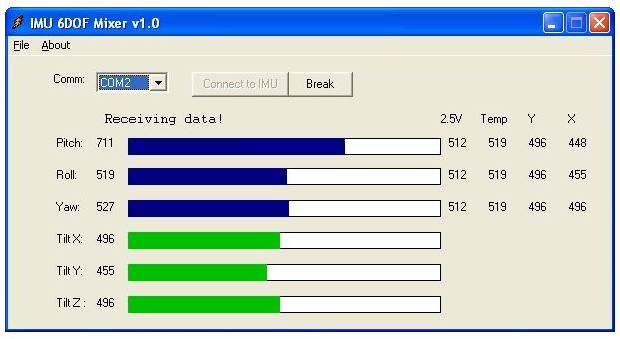
The entire interface for configuring and obtaining the gyroscope’s data is done through the serial port. Even without a dedicated application you can use any program, like HyperTerminal, to access the menus offered by the device. Using a serial port, any microcontroller kit that has no display and not even a keyboard can offer a quite friendly interface.
Writing serial protocols is not something that scares me. What is hard is having to remember how to program a User-Mode application that has windows, buttons and other controls, but nothing that a little MSDN does not solve. Driver programmers usually test everything they can using console applications, so I developed a small terminal software to deal directly with the device. Its source follows below and is a bonus for anyone who needs to play with serial ports some day.
/****
*** main
**
** And off we go...
*/
int _tmain(int argc, _TCHAR* argv[])
{
DWORD dwBytes,
dwError = ERROR_SUCCESS;
HANDLE hCom;
ULONG i;
UCHAR ucByteIn[512], ucByteOut;
DCB dcb;
COMMTIMEOUTS CommTimeouts;
//-f--> Here we open the desired serial port
hCom = CreateFile(L"COM3",
GENERIC_READ | GENERIC_WRITE,
0,
NULL,
OPEN_EXISTING,
0,
NULL);
//-f--> Checks whether we succeeded
if (hCom == INVALID_HANDLE_VALUE)
{
//-f--> Oops!
dwError = GetLastError();
printf("CreateFile failed with error %d.\n",
dwError);
return dwError;
}
//-f--> There are 7 kilos of serial port settings.
// Instead of configuring each one of them, we will just
// get the system default settings and modify
// only the ones we care about.
if (!GetCommState(hCom, &dcb))
{
//-f--> Oops!
dwError = GetLastError();
printf ("GetCommState failed with error %d.\n",
dwError);
CloseHandle(hCom);
return dwError;
}
//-f--> Here we modify the settings to set the
// settings required by the gyroscope.
// 57600, 8 N 1 (no flow control)
dcb.DCBlength = sizeof(DCB);
dcb.BaudRate = CBR_57600;
dcb.ByteSize = 8;
dcb.Parity = NOPARITY;
dcb.StopBits = ONESTOPBIT;
dcb.fDtrControl = DTR_CONTROL_DISABLE;
dcb.fRtsControl = RTS_CONTROL_DISABLE;
//-f--> Here we apply the settings we modified
if (!SetCommState(hCom, &dcb))
{
//-f--> Oops!
dwError = GetLastError();
printf ("SetCommState failed with error %d.\n",
dwError);
CloseHandle(hCom);
return dwError;
}
//-f--> I am going to configure the timeouts so that a
// read is completed after 100ms even if
// no character is received by the application.
// This prevents the application from getting stuck in ReadFile
// until a byte is received by the serial port
CommTimeouts.ReadIntervalTimeout = 0;
CommTimeouts.ReadTotalTimeoutMultiplier = 0;
CommTimeouts.ReadTotalTimeoutConstant = 100;
CommTimeouts.WriteTotalTimeoutConstant = 0;
CommTimeouts.WriteTotalTimeoutMultiplier = 0;
//-f--> Applies the timeout settings
if (!SetCommTimeouts(hCom, &CommTimeouts))
{
//-f--> Oops!
dwError = GetLastError();
printf ("SetCommTimeouts failed with error %d.\n",
dwError);
CloseHandle(hCom);
return dwError;
}
//-f--> Here begins the infinite loop that will run
// forever and ever until the end of days.
// Actually, if you press [ESC] it ends.
while(1)
{
//-f--> Checks whether there is a byte to be received by the
// application in the keyboard buffer.
if (_kbhit())
{
//-f--> Gets the key
ucByteOut = _getch();
//-f--> Checks whether the received key is [ESC]
if (ucByteOut == 27)
break;
//-f--> Sends the received byte to the serial port
if (!WriteFile(hCom,
&ucByteOut,
1,
&dwBytes,
NULL))
{
//--> Oops!
dwError = GetLastError();
break;
}
}
//-f--> Checks whether any byte was received by the
// serial port. Note that in this loop there is no
// typical Sleep() to keep from driving the CPU
// to 100%. This wait is performed inside the
// call to ReadFile(). The function waits for a
// byte for up to 100ms, as configured in the
// timeouts.
if (!ReadFile(hCom,
ucByteIn,
sizeof(ucByteIn),
&dwBytes,
NULL))
{
//-f--> Oops!
dwError = GetLastError();
break;
}
//-f--> Prints the received character sequence on the screen
for (i=0; i<dwBytes; i++)
{
if (ucByteIn[i] == 0x0d)
puts("");
else
printf("%c", ucByteIn[i]);
}
}
//-f--> Well, if we got to this point it is because we reached
// the end of days or the ESC key was pressed.
// Let us close the serial port and run away.
CloseHandle(hCom);
return dwError;
}
Opening a serial port is the simplest part of this story; the problem is deciding which port to open. Like any decent program, there should be a combo list with the serial ports available on the computer, where the user would choose one and that is it. From there it is just a matter of getting the port selected by the user and building a call to the CreateFile() routine as illustrated in the code above.
All right, I dragged the control onto the window I was programming and now I just have to fill it in. So I thought: “There must be some function like EnumerateCommPorts() in the API”, but that is not what the reference page showed me. – What do you mean there is not one? Google must know something about it. – I ended up finding out that this is a pretty common question out there. Some solve this problem by making a loop that tries to open the serial ports in sequence (COM1, COM2,… ), others use the QueryDosDevice() function and filter the Symbolic Links that start with “COM(n)”, but the method I am going to show here is capable of enumerating any type of interface using the SetupAPI.
Setup who?
The SetupAPI is a part of Plug-And-Play that provides services to User-Mode applications. One of the objectives of Plug-And-Play is to unify the configuration, use and enumeration of similar devices and services. This way all manufacturers of boards that offer serial port services can have their devices configured in a single way. Devices that offer serial port services must implement a predefined interface, that is, they must show themselves willing to receive IOCTLs and respond to them in a manner foreseen in the documentation.
The driver that wants to create devices that implement the serial port interface must declare this through the call to the IoRegisterDeviceInterface() routine. Here a device is associated with a device interface class, which is identified by a GUID. There are several predefined device interface classes in the system, as listed here, and the serial ports class is one of them. From there, your device will be enumerated by Plug-and-Play routines as a provider of a given interface.
All right then. What we have to do is use these interface enumeration functions to find out which devices implement the serial port interface. The SetupAPI is going to help us with that task. But before we take a look at the source, let us settle one little thing. I have seen different ways of using GUID_DEVINTERFACE_COMPORT, some include the Kernel-Mode header Ntddser.h, others define the GUID by hand, but what would be the correct way?
Defining the interface GUID
It all starts with the call to the SetupDiGetClassDevs() routine that will gather information about the group of devices that match the search criteria adopted in the parameters. We are going to want devices that implement the interface identified by GUID_DEVINTERFACE_COMPORT, but if we simply make the call as shown below…
hDevInfoSet = SetupDiGetClassDevs(&GUID_DEVINTERFACE_COMPORT,
NULL,
NULL,
DIGCF_PRESENT | DIGCF_INTERFACEDEVICE);
…we will get the error shown next.
1>z:\sources\samples\enumserialport.obj : error LNK2001: unresolved external
symbol _GUID_DEVINTERFACE_COMPORT
This happens because GUID_DEVINTERFACE_COMPORT is declared in WinIoCtl.h. Remember that this header is indirectly included by Windows.h when the WIN32_LEAN_AND_MEAN symbol is not defined, as I already commented on in this other post. But even including this header we still have the same problem. Let us look at this a little more closely.
In the WinIoCtl.h header we have:
DEFINE_GUID(GUID_DEVINTERFACE_COMPORT, 0x86e0d1e0L, 0x8089, 0x11d0,
0x9c, 0xe4, 0x08, 0x00, 0x3e, 0x30, 0x1f, 0x73);
But what is DEFINE_GUID anyway?
In GuidDef.h we have:
#ifdef INITGUID
#define DEFINE_GUID(name, l, w1, w2, b1, b2, b3, b4, b5, b6, b7, b8) \
EXTERN_C const GUID DECLSPEC_SELECTANY name \
= { l, w1, w2, { b1, b2, b3, b4, b5, b6, b7, b8 } }
#else
#define DEFINE_GUID(name, l, w1, w2, b1, b2, b3, b4, b5, b6, b7, b8) \
EXTERN_C const GUID FAR name
#endif // INITGUID
So now comes the resounding “Aaaah, right!”. GUID_DEVINTERFACE_COMPORT is a constant that is defined when the INITGUID symbol is defined; otherwise, this constant is only declared. The INITGUID symbol is defined in the InitGuid.h header. So, when you want to use the GUIDs declared with DEFINE_GUID, you will have to, in one of your modules, include the Initguid.h header before Windows.h. Since our example has only one module, it is easy. As usual, all the source code is contained in an example available for download.
//-f--> We will have to put these includes in the right order
// so that the GUID that identifies the
// GUID_DEVINTERFACE_COMPORT interface gets defined.
#include <InitGuid.h>
#include <Windows.h>
#include <SetupApi.h>
Enumerating interfaces
/****
*** EnumSerialInterfaces
**
** Routine that enumerates devices that
** implement the serial port interface
*/
DWORD EnumSerialInterfaces(void)
{
CHAR szFriendlyName[100];
HDEVINFO hDevInfoSet = NULL;
SP_DEVICE_INTERFACE_DATA DevInterfaceData;
SP_DEVINFO_DATA DevInfoData;
DWORD dwReturn,
dwInterfaceIndex = 0;
try
{
//-f--> Gathering information about devices that implement
// the desired interface that are present at the
// moment this routine is called.
hDevInfoSet = SetupDiGetClassDevs(&GUID_DEVINTERFACE_COMPORT,
NULL,
NULL,
DIGCF_PRESENT | DIGCF_INTERFACEDEVICE);
if (hDevInfoSet == INVALID_HANDLE_VALUE)
throw GetLastError();
DevInterfaceData.cbSize = sizeof(SP_DEVICE_INTERFACE_DATA);
//-f--> Now enumerates each of the interfaces
while (SetupDiEnumDeviceInterfaces(hDevInfoSet,
0,
&GUID_DEVINTERFACE_COMPORT,
dwInterfaceIndex++,
&DevInterfaceData))
{
DevInfoData.cbSize = sizeof(SP_DEVINFO_DATA);
//-f--> For each of the interfaces, we get the
// device that implements it.
if (SetupDiGetDeviceInterfaceDetail(hDevInfoSet,
&DevInterfaceData,
NULL,
0,
NULL,
&DevInfoData))
throw GetLastError();
//-f--> Now we just get the friendly name of the device
if (!SetupDiGetDeviceRegistryProperty(hDevInfoSet,
&DevInfoData,
SPDRP_FRIENDLYNAME,
NULL,
(PBYTE)szFriendlyName,
sizeof(szFriendlyName),
NULL))
throw GetLastError();
//-f--> Printf them...
printf("%d) %s\n",
dwInterfaceIndex,
szFriendlyName);
}
}
catch(DWORD dwError)
{
//-f--> Oops!
printf("Error %d on trying enumerate device interfaces.\n",
dwError);
dwReturn = dwError;
}
//-f--> Frees the obtained information
if (hDevInfoSet)
SetupDiDestroyDeviceInfoList(hDevInfoSet);
return dwReturn;
}
With this implementation, we will have the following output.
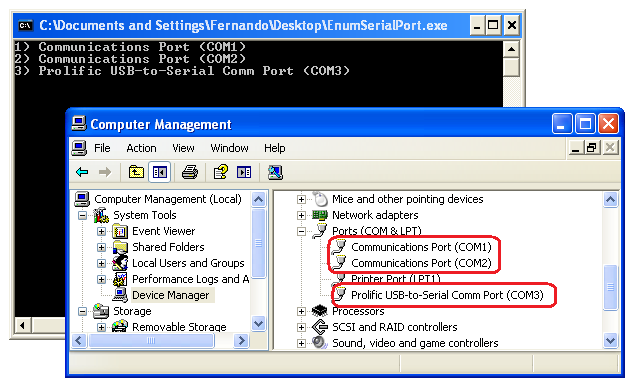
Cool, but that was not quite it…
Very well. The ports were enumerated, but how would I pass a string like that to the CreateFile() function? Will I have to keep interpreting that string to get the “COM1” part that is between parentheses?
Actually there are ways for you to obtain the Symbolic Link of the devices also using SetupAPI functions, but I imagine that what you wanted is the same as what I want. To fill a Combo Box with the simple name of the serial ports, like any normal program.
The port name, which is the “COMx” string we are looking for, is written as a registry value in the device’s key. Every serial port driver has to have this value as shown on this page. To obtain the registry key regarding the device, we will use another SetupAPI routine. The source below will enumerate the serial ports the way we want.
/****
*** EnumSerialPorts
**
** Routine that enumerates devices that
** implement the serial port interface and
** prints a name that is not friendly but that
** still serves some purpose.
*/
DWORD EnumSerialPorts(void)
{
CHAR szPortName[10];
HDEVINFO hDevInfoSet = NULL;
SP_DEVICE_INTERFACE_DATA DevInterfaceData;
SP_DEVINFO_DATA DevInfoData;
DWORD dwReturn,
dwSize,
dwInterfaceIndex = 0;
HKEY hKey;
try
{
//-f--> Gathering information about devices that implement
// the desired interface that are present at the
// moment this routine is called.
hDevInfoSet = SetupDiGetClassDevs(&GUID_DEVINTERFACE_COMPORT,
NULL,
NULL,
DIGCF_PRESENT | DIGCF_INTERFACEDEVICE);
if (hDevInfoSet == INVALID_HANDLE_VALUE)
throw GetLastError();
DevInterfaceData.cbSize = sizeof(SP_DEVICE_INTERFACE_DATA);
//-f--> Now enumerates each of the interfaces
while (SetupDiEnumDeviceInterfaces(hDevInfoSet,
0,
&GUID_DEVINTERFACE_COMPORT,
dwInterfaceIndex++,
&DevInterfaceData))
{
DevInfoData.cbSize = sizeof(SP_DEVINFO_DATA);
//-f--> For each of the interfaces, we get the
// device that implements it.
if (SetupDiGetDeviceInterfaceDetail(hDevInfoSet,
&DevInterfaceData,
NULL,
0,
NULL,
&DevInfoData))
throw GetLastError();
//-f--> Here we get the registry key of the
// device that implements the interface.
hKey = SetupDiOpenDevRegKey(hDevInfoSet,
&DevInfoData,
DICS_FLAG_GLOBAL,
0,
DIREG_DEV,
KEY_QUERY_VALUE);
if (hKey == INVALID_HANDLE_VALUE)
throw GetLastError();
//-f--> Here we get the PortName value from the Registry
dwSize = sizeof(szPortName);
dwReturn = RegQueryValueEx(hKey,
"PortName",
NULL,
NULL,
(LPBYTE)szPortName,
&dwSize);
RegCloseKey(hKey);
if (dwReturn != ERROR_SUCCESS)
throw dwReturn;
//-f--> Printf them...
printf("%d) %s\n",
dwInterfaceIndex,
szPortName);
}
}
catch(DWORD dwError)
{
//-f--> Oops!
printf("Error %d on trying enumerate device interfaces.\n",
dwError);
dwReturn = dwError;
}
//-f--> Frees the obtained information
if (hDevInfoSet)
SetupDiDestroyDeviceInfoList(hDevInfoSet);
return dwReturn;
}
Now yes…

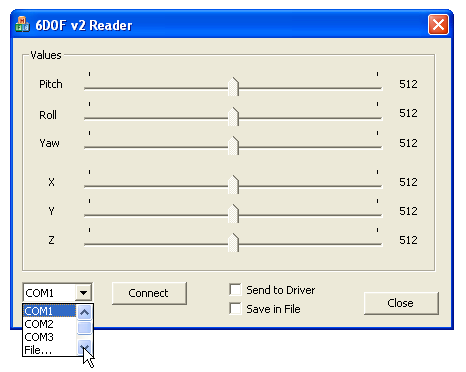
Putting this in a combo box is already a subject for another blog. For a driver developer, the window below is not so bad after all.
See you! 😉
Leave a Reply