

A few weeks ago, here I was all tangled up with my college project. With all this activity, what I have been telling my friends is that my Twitter looks more like a schedule. But anyway, in the middle of so much rush, I received the following question from reader J̼lio C̩sar (Rio de Janeiro РRJ):
“How do you implement communication between a driver and an application such that the driver initiates the communication? That is, I do not want the application to send a message to the driver, but rather the driver to send a message to the application.”
My short but blunt answer is that there are no means for a driver to simply wake up on a sunny morning, scratch its belly while stretching and say to itself: “Today I am going to surprise my friend notepad.exe. I am going to send it a postcard from Kernel-land.”
A Client-Server model
Windows works on a Client-Server model, where the Server side would be the Kernel, which serves the requests of its clients, which in this case are the applications. No activity is initiated by the Kernel of its own free will. It is always the applications that, using the system’s native API, request notifications from the system for a series of events.
“But Fernando, what about the plug-and-play notifications to user-mode applications?”
Actually they are requested by the applications using the RegisterDeviceNotification() routine. This subject is quite nice to comment on in a future post. Let me jot it down here on my list of posts to write.
“But Fernando, when the system starts, do not things start automagically?”
The Boot is a special procedure in which the Kernel starts only the Session Manager in User-land, also known among the close ones as Smss. Smss is a native process (which uses only the native API) and is considered a trusted component. It does not use the Windows API because the Windows Subsystem (Csrss) does not exist yet. From there on a series of initializations originated by Smss and its child processes occurs, but I will leave the details about this to the Slug. That reminded me that Csrss stands for “Client Server Run-Time Subsystem”.
“But Fernando, what about the services?”
Services are started by a process called Services.exe, which in turn was also started by another component during the Boot process.
“But Fernando, what about the boot drivers?”
The loading of drivers is not considered a notification to user-mode.
“But Fernando, does it rain in September?”
Well, that is enough, right? Let us talk about what matters now.
Pending I/O operations
We have already seen in another post that an application can request services from the driver. To give the impression that the driver sent a notification to the application, we can use an operation that would remain pending until the desired event occurs. Such as a read operation on a serial port, which would remain stuck in the ReadFile() call until one or more characters were received.
This works reasonably well, but we would have some complications if the event never occurs and your application needs to leave because it left the beans on the stove or something like that. So, we would have to adopt a multi-threaded solution, where a second thread would warn the pending thread that it is too late, that there is no point in waiting for the event anymore, it is over, meow, forget it, get real.
For the people who suffer from “thread-phobia”, a solution using Overlapped I/O would fit like a glove, but I am not going to talk about that today. Actually that is already on my list, but it is not going to be today.
Sharing an event
The way I most like to work is by sharing an event. Does everyone know what an event is? It may seem silly, but there are a lot of people who do not really know what a handle is and want to program the Kernel. That worries me a little. What kind of drivers can these people generate? Allow me to open a parenthesis here to ask a question: What do you think about, besides me offering driver posts, me offering posts about System Programming? Things like Processes, Threads, Objects, Handles, Virtual Memory, Heaps, Dispatch Objects, Synchronization and so on. Send me e-mails with suggestions, which will be very welcome.
Getting back to what matters, if an application creates an event and sends its handle to the driver, the driver will be able to signal the existence of relevant information to the application. So the application can wait for this event, and when it is signaled, the application does the I/O to fetch such information using the means of communication we have already seen in other posts.
Image Notifier
To exemplify the reception of events generated by a driver, today we are going to see a driver that will warn us whenever an image is mapped in a process.
First we are going to define an interface for this communication. The application will need to send the handle of an event to the driver; this will also tell the driver that the application wishes to receive notifications about image mapping. For that we are going to define our IOCTLs as we already saw in this other post.
//-f--> This will be the IOCTL to notify the driver that an
// application is interested in the image load
// events. This IOCTL must carry the handle of the event
// to be signaled when there is data for the application.
#define IOCTL_IMG_START_NOTIFYING CTL_CODE(FILE_DEVICE_UNKNOWN, \
0x800, \
METHOD_BUFFERED, \
FILE_ANY_ACCESS)
//-f--> I know it is silly to create a structure with a single member,
// but besides being more didactic, this makes it easier for that
// crowd that is going to do "Copy and Paste" of my code into
// other projects. Later they will want to send more data
// to the driver and will get tangled up with it. And then you know whose
// fault it is: "I got this code on that fool's blog!".
typedef struct _IMG_START_NOTIFYING
{
HANDLE hEvent;
} IMG_START_NOTIFYING, *PIMG_START_NOTIFYING;
//-f--> This will be the IOCTL that the application will send to the driver to
// get the details about the image load in a process.
#define IOCTL_IMG_GET_IMAGE_DETAIL CTL_CODE(FILE_DEVICE_UNKNOWN, \
0x801, \
METHOD_BUFFERED, \
FILE_ANY_ACCESS)
//-f--> Here I am going to define a maximum path of 260 characters, but
// there may be cases of longer paths. I am not going to handle
// all the cases nor optimize the transport of this buffer
// by taking only the valid bytes.
#define IMG_MAX_IMAGE_NAME 260
//-f--> Here follows the path of the image that the driver will obtain
// before notifying the application.
typedef struct _IMG_IMAGE_DETAIL
{
CHAR ImageName[IMG_MAX_IMAGE_NAME];
} IMG_IMAGE_DETAIL, *PIMG_IMAGE_DETAIL;
//-f--> Here the application says it is no longer interested in the
// image notifications. This will make the driver
// release the reference it made to the handle.
#define IOCTL_IMG_STOP_NOTIFYING CTL_CODE(FILE_DEVICE_UNKNOWN, \
0x802, \
METHOD_BUFFERED, \
FILE_ANY_ACCESS)
I am not going to put all the code here in the post, but it is all available in the example for download at the end of this post. Remember that nine out of ten dentists recommend reading the comments for a better understanding of the example. The application will basically create an event and send its handle to the driver through an IOCTL.
//-f--> Creates the event that will be shared.
hNotificationEvt = CreateEvent(NULL,
TRUE,
FALSE,
NULL);
_ASSERT(hNotificationEvt);
printf("Requesting device to start notifying.\n");
//-f--> We copy the event handle into the structure
// that will be sent to the driver. As we know, handles
// are valid only in the context of this process,
// so we are assuming that our driver will be
// at the top of the device stack.
StartNotifying.hEvent = hNotificationEvt;
if (!DeviceIoControl(hDevice,
IOCTL_IMG_START_NOTIFYING,
&StartNotifying,
sizeof(StartNotifying),
NULL,
0,
&dwBytes,
NULL))
{
//-f--> Take a deep breath and open WinDbg...
dwError = GetLastError();
printf("Error #%d on starting device notification.\n",
dwError);
__leave;
}
When the driver receives this IOCTL, it will acquire a reference to the object pointed to by the handle. Note that for this the driver uses the ObReferenceObjectByHandle() routine of the Object Manager, which besides incrementing the object’s reference counter, also certifies that the handle is of the object type you expect to receive. This would prevent, for some reason, the handle of another object from being passed in place of the event handle. The result of this call will be a pointer to an event received by the driver. As we know, objects have their header in a standard format, but the body of the object varies depending on its type. Imagine that someone sent a handle to a thread in place of a handle to an event; we could use the event routines to manipulate a thread and the chance of everything going blue is high. That is why the use of the ObjectType parameter, although optional, is highly recommended.
//-f--> Gets a reference to the object
nts = ObReferenceObjectByHandle(pStartNotifying->hEvent,
EVENT_ALL_ACCESS,
*ExEventObjectType,
UserMode,
(PVOID*)&g_pEvent,
NULL);
“Fernando, is this really necessary? My application is the only one that is going to use this driver, and it will always send a handle to an event.”
This kind of precaution prevents a smart-aleck program from sending anything to your driver, deliberately producing a blue screen.
“Fernando, in my opinion what you really like is to complicate things. Couldn’t I simply make a copy of the handle and use routines like ZwSetEvent() that receive the event handle as a parameter?”
Look, the handle is valid only within the process that obtained it. In our case, that handle is valid only in the context of our test application. Image notifications run in an arbitrary context, that is, God knows in which process context. That is why we will have to obtain a reference that is valid in any context. The pointer obtained by the ObReferenceObjectByHandle() routine is valid in any context, because it points to the object itself, which resides in System Space. If you do not know what System Space means, then take a stroll through this post.
Well, after that the application is going to keep waiting for the event to be signaled by the driver. In the code below, two events are monitored; one of them is signaled by the driver while the other is signaled by the application itself at the moment of ending its activity.
//-f--> Here we create an array of handles to wait
// for multiple objects.
hObjects[0] = hFinishEvt;
hObjects[1] = hNotificationEvt;
do
{
//-f--> Waits either for a signal from the device indicating the
// presence of data in the driver, or a signal from the
// primary thread saying that soap-opera
// nonsense and stuff.
dwWait = WaitForMultipleObjects(2,
hObjects,
FALSE,
INFINITE);
switch(dwWait)
{
case WAIT_FAILED:
//-f--> Come on, Murphy, give it a rest!
dwError = GetLastError();
printf("Error #%d on waiting for device notification.\n",
dwError);
__leave;
case WAIT_OBJECT_0 + 1:
//-f--> Whoa! The driver has something for us, let us go get it.
if (GetImageDetail(hDevice) != ERROR_SUCCESS)
__leave;
break;
}
//-f--> We will stay in this while the termination event
// is not signaled by the primary thread.
} while(dwWait != WAIT_OBJECT_0);
When the event is signaled, the application will send an IOCTL to get the data from the driver. Our test application also prints this data on the screen for pure fun. Let us take a look at the driver’s code to find out how this happens.
During initialization, the driver calls the PsSetLoadImageNotifyRoutine() routine to register a callback routine that is called whenever an image is mapped to some process.
//-f--> Registers a callback routine to receive
// the notifications of images mapped to
// processes.
nts = PsSetLoadImageNotifyRoutine(OnLoadImage);
ASSERT(NT_SUCCESS(nts));
Our callback routine converts the path of the mapped image from Unicode to ANSI. More details about string conversion in this post. Next the routine places this path in a list and sets the event sent by the application. If you still do not know how to play with linked lists in the Windows kernel, then read this post.
VOID
OnLoadImage(IN PUNICODE_STRING pusFullImageName,
IN HANDLE hProcessId,
IN PIMAGE_INFO pImageInfo)
{
PIMG_EVENT_NODE pNode;
ANSI_STRING asImageName;
NTSTATUS nts;
//-f--> We are going to acquire control of the variables
// shared by different threads.
nts = KeWaitForMutexObject(&g_EventMtx,
UserRequest,
KernelMode,
FALSE,
NULL);
ASSERT(NT_SUCCESS(nts));
__try
{
//-f--> Checks whether the application is interested in this
// event.
if (!g_pEvent)
__leave;
//-f--> Allocates a node for the list of image paths
pNode = (PIMG_EVENT_NODE)ExAllocatePoolWithTag(PagedPool,
sizeof(IMG_EVENT_NODE),
IMG_TAG);
if (!pNode)
{
//-f--> Oops!
ASSERT(FALSE);
__leave;
}
//-f--> Initializes an ANSI_STRING to use in the conversion
// of the image path. We will always provide one byte
// less to reserve space for adding a
// null terminator.
RtlInitEmptyAnsiString(&asImageName,
pNode->ImageDetail.ImageName,
sizeof(pNode->ImageDetail.ImageName) - 1);
//-f--> Does the conversion without allocating the result.
nts = RtlUnicodeStringToAnsiString(&asImageName,
pusFullImageName,
FALSE);
if (!NT_SUCCESS(nts))
{
//-f--> Oops!
ASSERT(FALSE);
ExFreePool(pNode);
__leave;
}
//-f--> Places the null terminator so that the test
// application can count on it when doing the print.
asImageName.Buffer[asImageName.Length] = 0;
//-f--> Inserts the node into the list.
InsertTailList(&g_ListHead,
&pNode->Entry);
//-f--> We set the event informing the application that there is
// data in the list to be read.
KeSetEvent(g_pEvent,
IO_NO_INCREMENT,
FALSE);
}
__finally
{
//-f--> Finally, releases the mutex and runs for the hug.
KeReleaseMutex(&g_EventMtx,
FALSE);
}
}
When the event is signaled, the application wakes up from its deep sleep and finds out that the driver has data for it. So it sends an IOCTL to get such data. This IOCTL will execute the routine below, removing the first element of the list and checking whether there is still more data to be collected by the application. If the list empties in this call, the driver resets the event so that the application goes back to sleep waiting for the records of newly mapped images.
NTSTATUS
OnGetImageDetail(PIMG_IMAGE_DETAIL pImageDetail)
{
NTSTATUS nts;
PLIST_ENTRY pEntry;
PIMG_EVENT_NODE pNode;
//-f--> Acquires the mutex
nts = KeWaitForMutexObject(&g_EventMtx,
UserRequest,
KernelMode,
FALSE,
NULL);
ASSERT(NT_SUCCESS(nts));
//-f--> Checks whether the list is empty. Always
// use this routine before trying to remove
// an element from the list.
if (!IsListEmpty(&g_ListHead))
{
//-f--> Gets the address of the Entry
pEntry = RemoveHeadList(&g_ListHead);
//-f--> Gets the address of the node
pNode = CONTAINING_RECORD(pEntry,
IMG_EVENT_NODE,
Entry);
//-f--> Copies to the application buffer.
RtlCopyMemory(pImageDetail,
&pNode->ImageDetail,
sizeof(IMG_IMAGE_DETAIL));
//-f--> Frees the node and that's that
ExFreePool(pNode);
nts = STATUS_SUCCESS;
}
else
nts = STATUS_NO_MORE_ENTRIES;
//-f--> It may be that in this call the list has
// become empty. So we check again
// and reset the event so that the application
// does not come back here.
if (IsListEmpty(&g_ListHead))
KeResetEvent(g_pEvent);
//-f--> Releases the mutex and that's it.
KeReleaseMutex(&g_EventMtx,
FALSE);
return nts;
}
The result of so much blah-blah-blah
After the driver is compiled, installed and started, we will be able to run our test application and wait for something to be executed. When a process is created, both its module and the DLLs it depends on are mapped in the system. This will trigger our callback routine in the driver and make the whole thing work. If you do not know how to compile, install and start a driver, this post may help you.
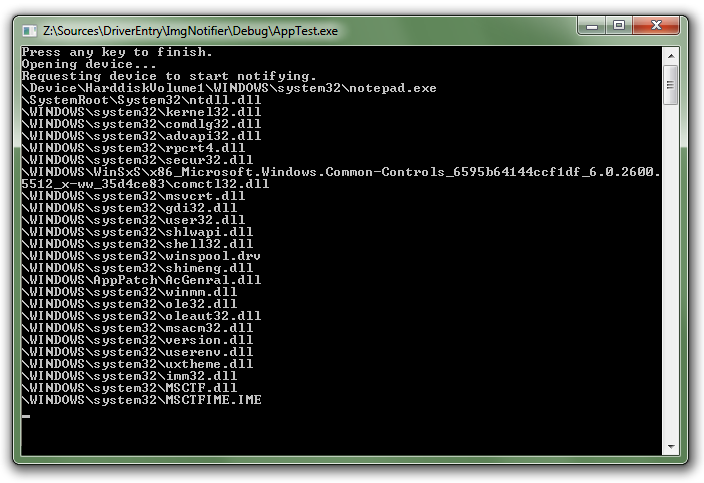
The image above is the result of running notepad.exe while our test application was waiting for events, but any other process could trigger such events. This post, besides providing us with this example of an inverted call, also shows us how to play with Mutex Objects, which was the question of another reader, Ismael Rocha (BrasÃlia – DF).
Now let me get back to my college project.
See you!
Leave a Reply