

Is there anything more trivial than manipulating strings? I believe the correct answer would be “It depends“. When I had finished my technical course in Industrial Computing in 1995, I thought I knew a lot about the C language. After all, I already knew how to manipulate strings. Copy, concatenate, reverse, search for words… What else should a programmer know? When I started my internship and began dealing with real-world programs, I found out that I knew nothing. But one thing is certain, I knew how to manipulate strings. This post should help a lot the C++ programmers who know everything about Templates, Smart Pointers, STL and magical things that abstract reality, making the programmer’s life easier. With all these reference-counting resources and overloading of every operator there is, things start to get hazy and you begin to wonder: “But where is the buffer, really?”. Today we are just going to take a light stroll through the UNICODE_STRING and ANSI_STRING structures and some functions for converting between them. It may seem silly, but if you do not know how to play with strings, why learn the rest? It is all going to end in a blue screen anyway.
And back in kindergarten…
We learned from the teacher back in kindergarten that strings are chains of characters. So we could tell the story of our lives just by placing one character in front of another.
CHAR szExemplo[] = "Tava ruim lá na Bahia, profissão de bóia-fria\n"
"Trabalhando noite e dia, num era isso que eu queria\n"
"Eu vim-me embora pra \"Sum Paulo\",\n"
"Eu vim no lombo dum jumento com pouco conhecimento\n"
"Enfrentando chuva e vento e dando uns peido fedorento (vish)\n"
"Até minha bunda fez um calo\n"
"Chegando na capital, uns puta predião legal\n"
"As mina pagando um pau, mas meu jumento tava mal\n"
"Precisando reformar\n"
"Fiz a pintura, importei quatro ferradura\n"
"Troquei até dentadura e pra completar a belezura\n"
"Eu instalei um Road-Star!";
Jumento Celestino / Mamonas Assassinas
There are two things you must know so that you can keep reading this post. One of them is that these characters need to be stored somewhere, whether in a local variable, allocated on the heap or even in the initialized data segment. The other thing is that strings are normally terminated by a NULL character, but the absence of it does not disqualify a string. This means we can have strings without terminators where their size is indicated by another variable. I leave here a hook for the Slug to explain these things to the interested boys and girls.
Another important characteristic is that a character is not always equal to a Byte. There are strings composed of wide characters. Wide characters, contrary to what people think, are not lucky characters, but rather characters formed by 16-bit values. With strings formed by such characters, one can express words in any language. This explains how Windows manages to deal with alien file names when you try to install the drivers for the HiPhone you bought in Chinatown.
Besides, imagine that an error occurs during the encryption process of your hard drive. It would be vital that a detailed error message be displayed to you regardless of the nationality of the product. Whether the information is going to help is another matter.
Four types of strings
Of these, we have two strings that we are already used to seeing in user-Mode, both terminated with a NULL character.
CHAR szString[] = "Uma string de CHAR";
WCHAR wzString[] = L"Uma string de WCHAR";
The other two strings are the ones we normally see in kernel-mode.
typedef struct _UNICODE_STRING {
USHORT Length;
USHORT MaximumLength;
PWSTR Buffer;
} UNICODE_STRING, *PUNICODE_STRING;
typedef struct _STRING {
USHORT Length;
USHORT MaximumLength;
PCHAR Buffer;
} ANSI_STRING, *PANSI_STRING;
These strings are defined by structures with three members, which I describe below. The behavior of the routines and macros that manipulate them is very similar. For this reason I am going to concentrate my examples on UNICODE_STRING, since the Win32 subsystem converts everything to unicode when it passes a call to the kernel.
-
Buffer: It is a pointer to the region of memory where the characters are stored.
-
Length: Indicates the number of valid bytes of the string. This size is always expressed in bytes, even if this is a WCHAR string.
-
MaximumLength: Indicates the maximum size this string can have.
To understand how these members are interpreted, take a look at the example below:
void OsTresMembros(void)
{
WCHAR wsUmArray[200];
UNICODE_STRING usString;
//-f--> I indicate where the characters of this string
// will be stored.
usString.Buffer = wsUmArray;
//-f--> We have not written anything in the buffer yet,
// so nothing that is in the buffer
// is valid.
usString.Length = 0;
//-f--> Even though the buffer is not initialized
// it is still there and can hold a string
// of at most its size in bytes.
usString.MaximumLength = sizeof(wsUmArray);
}
Here we see an empty unicode string, since it has zero valid bytes, but its storage capacity is up to 200 characters. Note that the characters are stored in an array that is on the stack. This means that no memory leak will be caused by the ending of this routine.
Initializing Strings
We can also use some macros that do the initialization of these structures.
void InitString(void)
{
UNICODE_STRING usOutraConstante;
UNICODE_STRING usVazia;
WCHAR wzBuffer[30] = L"Isso não será considerado.";
//-f--> Initializes a string at its creation.
UNICODE_STRING usConstante = RTL_CONSTANT_STRING(L"Uma string.");
//-f--> Initializes a constant string.
RtlInitUnicodeString(&usOutraConstante,
L"Uma outra string constante que não muda.");
//-f--> Initializes an empty string for later use
RtlInitEmptyUnicodeString(&usVazia,
wzBuffer,
sizeof(wzBuffer));
}
Note the values of these structures.
kd> ?? usConstante
struct _UNICODE_STRING
"Uma string."
+0x000 Length : 0x16
+0x002 MaximumLength : 0x18
+0x004 Buffer : 0xf8cd8600 "Uma string."
kd> db 0xf8cd8600 L0x18
f8cd8600 55 00 6d 00 61 00 20 00-73 00 74 00 72 00 69 00 U.m.a. .s.t.r.i.
f8cd8610 6e 00 67 00 2e 00 00 00 n.g.....
Although the maximum capacity of this string is 0x18 characters, only 0x16 bytes are valid. That is because the macro disregards the NULL terminator that the C/C++ compiler left as a bonus.
The RTL_CONSTANT_STRING() macro lets us initialize the string at its creation, but another notable feature of it is that it screws up the IntelliSense of Visual Studio (2008 at least). So if you really like IntelliSense, prefer to use the RtlInitUnicodeString() macro.
kd> ?? usVazia
struct _UNICODE_STRING
"Isso não será considerado."
+0x000 Length : 0
+0x002 MaximumLength : 0x3c
+0x004 Buffer : 0xf8ae5c34 "Isso não será considerado."
Oops! How can a string with zero valid bytes be displayed by WinDbg? Actually, what happens is that WinDbg takes the UNICODE_STRING structure apart and shows each of the members here. In this case, there is an array of WCHAR with well-behaved values here. Do not blame the poor thing. You are the one who is spoiled by Visual Studio.
kd> db 0xf8ae5c34 L0x3c
f8ae5c34 49 00 73 00 73 00 6f 00-20 00 6e 00 e3 00 6f 00 I.s.s.o. .n...o.
f8ae5c44 20 00 73 00 65 00 72 00-e1 00 20 00 63 00 6f 00 .s.e.r... .c.o.
f8ae5c54 6e 00 73 00 69 00 64 00-65 00 72 00 61 00 64 00 n.s.i.d.e.r.a.d.
f8ae5c64 6f 00 2e 00 00 00 00 00-00 00 00 00 o...........
But this data is only there by chance. It is not considered part of a valid unicode string. This gets in the way a bit when debugging, because even the local variables window also shows this invalid content.
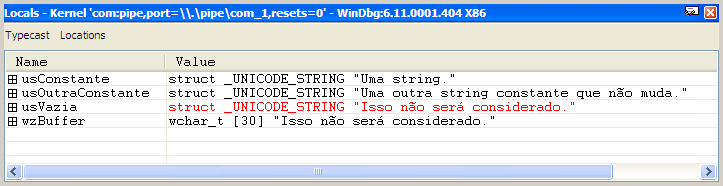
The !ustr extension shows only the valid data of a unicode string.
kd> !ustr usConstante
String(22,24) at f899fc6c: Uma string.
kd> !ustr usVazia
String(0,60) at f8ae5c1c:
Is the terminator necessary?

Not at all! You can well observe that in the previous examples, the macro left the terminator out of the valid bytes. Considering the terminator as a valid byte is a mistake and can cause confusion. Imagine comparing two distinct strings that carry the same content, but one of them considers the terminator as valid information. Such strings will be different, since they have a different length.
I believe what really matters is not to count on the terminator in the strings you receive from other components. It is a fact that most of the time, the buffer has a terminator, and that even though it is not considered valid information, the terminator is still there. Never count on that unless there is some note in the documentation. I have seen people use the Buffer member as a parameter for a call to the wcslen() routine, for example. Besides the risk of getting incorrect information, there is also a bonus of possibly generating a blue screen.
“But Fernando, I have already tested this on several operating systems and it always worked.”
That does not justify anything; you cannot rely on tests, but on documentation. When your product spreads across the market, it faces many different environments, with the most diverse filters, anti-viruses, monitors and so on. You cannot be sure of the implementation of any software. The best we can hope from them is that they rely on the documentation.
Manipulating Strings
The members of the UNICODE_STRING structure are basically used by manipulation routines in order to check whether the existing buffer is enough for the desired operation. Therefore, before using a string, make sure it was initialized correctly. In the case of a string copy, the destination string will need to be initialized even if empty.
void CopyString(void)
{
UNICODE_STRING usSource;
UNICODE_STRING usTarget;
WCHAR wzTarget[10];
//-f--> Here we initialize our source string.
RtlInitUnicodeString(&usSource,
L"12345678901234567890");
//-f--> Here we initialize our destination string.
RtlInitEmptyUnicodeString(&usTarget,
wzTarget,
sizeof(wzTarget));
//-f--> Performs the copy
RtlCopyUnicodeString(&usTarget,
&usSource);
}
Here we see the example of a string copy where the source string is larger than the destination one. In that situation we will not have an access violation, but the destination buffer will be filled completely. Note that the routine did not leave us the comfortable terminator.
kd> !ustr usTarget
String(20,20) at f89a3c6c: 1234567890
kd> ?? usTarget
struct _UNICODE_STRING
"1234567890"
+0x000 Length : 0x14
+0x002 MaximumLength : 0x14
+0x004 Buffer : 0xf89a3c54 "1234567890"
kd> db 0xf89a3c54 L0x20
f89a3c54 31 00 32 00 33 00 34 00-35 00 36 00 37 00 38 00 1.2.3.4.5.6.7.8.
f89a3c64 39 00 30 00 98 5d 5f 00-14 00 14 00 54 3c 9a f8 9.0..]_.....T<..
Unlike the RtlCopyUnicodeString() routine, some other routines return STATUS_BUFFER_TOO_SMALL to us when the buffer is insufficient.
VOID
RtlCopyUnicodeString(
IN OUT PUNICODE_STRING DestinationString,
IN PCUNICODE_STRING SourceString
);
NTSTATUS
RtlAppendUnicodeStringToString(
IN OUT PUNICODE_STRING Destination,
IN PUNICODE_STRING Source
);
There is a series of string manipulation routines in the WDK, but there is always some routine missing compared to the broad library of routines of the C/C++ standard library. Routines like strrchr() for example. When necessary we will have to build a version that manipulates UNICODE_STRING structures in the same way. Here is a basic list of string routines that the WDK supports. Other functions are listed here, but we will talk about them later.
But where is the buffer, really?
The UNICODE_STRING structure does not store a buffer, but rather a pointer to it. This way, the manner of discarding a string varies depending on the way you obtained it. In the examples we have seen so far, the buffers used are in initialized data or in local arrays of the example function. There are routines that initialize and allocate strings as a way of returning the desired information. In these cases, it is necessary to free the buffer you received. This is the case of the routines that do the conversion from ANSI_STRING to UNICODE_STRING and vice versa. They are RtlUnicodeStringToAnsiString() and RtlAnsiStringToUnicodeString().
NTSTATUS
RtlAnsiStringToUnicodeString(
IN OUT PUNICODE_STRING DestinationString,
IN PANSI_STRING SourceString,
IN BOOLEAN AllocateDestinationString
);
NTSTATUS
RtlUnicodeStringToAnsiString(
IN OUT PANSI_STRING DestinationString,
IN PUNICODE_STRING SourceString,
IN BOOLEAN AllocateDestinationString
);
The example below does a conversion from ANSI to UNICODE with allocation of the result, and then frees the received buffer.
void ConvertString(void)
{
ANSI_STRING asString;
UNICODE_STRING usString;
//-f--> Here we initialize our source string.
RtlInitAnsiString(&asString,
"Um exemplo simples.");
//-f--> In this case we will not need to initialize the
// destination string. The routine will do that for us.
RtlAnsiStringToUnicodeString(&usString,
&asString,
TRUE);
//-f--> Prints the resulting string
DbgPrint("String convertida: %wZ\n",
&usString);
//-f--> We free the buffer allocated in the conversion.
RtlFreeUnicodeString(&usString);
}
You yourself can write a routine that generates UNICODE_STRINGs by allocating the buffer dynamically. The buffer can be allocated dynamically using ExAllocatePoolWithTag() or one of its sisters. However, when freeing the buffer of this string, use the appropriate function, which in this example would be ExFreePoolWithTag(). Do not go around using RtlFreeUnicodeString() left and right. Enjoy in moderation. Only use that routine to free strings that were obtained by functions like RtlAnsiStringToUnicodeString(), whose documentation indicates the use of RtlFreeUnicodeString().
“…, the caller must deallocate the buffer by calling RtlFreeUnicodeString.”
Safe Strings in Kernel
A portion of the string manipulation routines of the C/C++ standard library, such as strcpy() and sprintf(), are also available in the kernel, but the growing concern with security in buffer manipulation caused the safe functions to be made available both for user-mode and for kernel-mode. For details on the use of these functions consult this link.
One more example driver
This other post brings the example of a driver that keeps a list of strings in memory. In this other post, that same example was evolved so that different lists were kept under different contexts. Now I am going to evolve that example again. The application will keep sending NULL-terminated strings during the write, the driver will create ANSI_STRINGs from them and convert them into UNICODE_STRINGs before placing them in the list.
Most of the modifications are in the read and write routines, so I am just going to show the code of these routines here. In any case, the whole project including the driver and a test application are available for download at the end of this post. Let us start with the write routine that sends the strings to the driver. As always, all the relevant information is in the comments.
/****
*** OnWrite
**
** The application is sending a string.
*/
NTSTATUS
OnWrite(IN PDEVICE_OBJECT pDeviceObj,
IN PIRP pIrp)
{
PIO_STACK_LOCATION pStack;
ANSI_STRING asString;
PSTRING_LIST pStringList;
PSTRING_REG pStringReg;
ULONG ulBytes;
KIRQL kIrql;
NTSTATUS nts;
//-f--> We get the current Stack Location.
pStack = IoGetCurrentIrpStackLocation(pIrp);
//-f--> Gets the head of the list.
pStringList = (PSTRING_LIST)pStack->FileObject->FsContext;
//-f--> What we have in the system buffer here is an array
// of NULL-terminated bytes. We are going to initialize
// an ANSI_STRING with this buffer.
RtlInitAnsiString(&asString,
(PCSZ)pIrp->AssociatedIrp.SystemBuffer);
//-f--> Here we allocate the node that will be placed in the list
pStringReg = (PSTRING_REG) ExAllocatePoolWithTag(NonPagedPool,
sizeof(STRING_REG),
STR_LST_TAG);
//-f--> To do the conversion to UNICODE_STRING, we are going to
// ask the routine to make the allocation of the resulting
// buffer. For this reason, we will not need to initialize
// the output string.
nts = RtlAnsiStringToUnicodeString(&pStringReg->usString,
&asString,
TRUE);
if (!NT_SUCCESS(nts))
{
//-f--> Oops! We probably did not have memory for that.
// We will signal the failure and inform the IoManager
// that zero bytes were copied.
ExFreePoolWithTag(pStringReg, STR_LST_TAG);
pIrp->IoStatus.Information = 0;
}
else
{
//-f--> We will hold the spinlock to avoid contention
// on access to the list.
KeAcquireSpinLock(&pStringList->SpinLock,
&kIrql);
//-f--> Inserts the node into the list.
InsertTailList(&pStringList->ListHead,
&pStringReg->Entry);
//-f--> Releases the spinlock.
KeReleaseSpinLock(&pStringList->SpinLock,
kIrql);
//-f--> Here we inform the IoManager that all the bytes
// sent by the application were received
// successfully by the driver.
pIrp->IoStatus.Information = pStack->Parameters.Write.Length;
}
//-f--> The Information field was already filled in, we will just
// copy the status of the operation and complete the IRP.
pIrp->IoStatus.Status = nts;
IoCompleteRequest(pIrp, IO_NO_INCREMENT);
return nts;
}
Now let us look at the retrieval of the strings on the read.
/****
*** OnRead
**
** The application wants to receive the strings sent
** by it.
*/
NTSTATUS
OnRead(IN PDEVICE_OBJECT pDeviceObj,
IN PIRP pIrp)
{
ANSI_STRING asString;
PIO_STACK_LOCATION pStack;
PSTRING_LIST pStringList;
PSTRING_REG pStringReg;
PLIST_ENTRY pEntry;
KIRQL kIrql;
NTSTATUS nts;
//-f--> We will leave this field at zero until we are
// sure that the copy was made to the application
// buffer
pIrp->IoStatus.Information = 0;
//-f--> We get the current Stack Location.
pStack = IoGetCurrentIrpStackLocation(pIrp);
//-f--> Gets the head of the list.
pStringList = (PSTRING_LIST)pStack->FileObject->FsContext;
//-f--> We will return to the application only an array of CHAR
// with a NULL terminator. The strings are stored as
// UNICODE_STRING. We will convert them to ANSI_STRING.
// Here we will initialize the ANSI_STRING that will receive
// the result of the UNICODE_STRING conversion.
//-f--> We will offer Length-1 to reserve a byte for
// the null terminator after conversion.
RtlInitEmptyAnsiString(&asString,
(PCHAR)pIrp->AssociatedIrp.SystemBuffer,
(USHORT)pStack->Parameters.Read.Length - 1);
//-f--> Here we will acquire the spinlock to avoid contention
// on access to the list.
KeAcquireSpinLock(&pStringList->SpinLock,
&kIrql);
//-f--> Checks whether the list is empty.
if (IsListEmpty(&pStringList->ListHead))
{
//-f--> Signals an error on the read and releases the spinlock right away.
nts = STATUS_NO_MORE_ENTRIES;
KeReleaseSpinLock(&pStringList->SpinLock,
kIrql);
}
else
{
//-f--> Removes the record from the list and releases the spinlock right away.
pEntry = RemoveHeadList(&pStringList->ListHead);
KeReleaseSpinLock(&pStringList->SpinLock,
kIrql);
pStringReg = CONTAINING_RECORD(pEntry,
STRING_REG,
Entry);
//-f--> Here we convert the string. Note that we do not request
// the allocation of the buffer. We are using the system
// buffer to receive the result of the conversion. In this
// case the destination string must be initialized.
nts = RtlUnicodeStringToAnsiString(&asString,
&pStringReg->usString,
FALSE);
if (NT_SUCCESS(nts))
{
//-f--> Here we use that byte we reserved and thus
// the null terminator is also copied by the IoManager
// from the SystemBuffer to the application buffer
asString.Buffer[asString.Length] = 0;
//-f--> We need to tell the IoManager the number of
// bytes that will be copied to the application buffer.
// That size is the size of the converted string plus
// one byte taken by the NULL terminator we placed.
pIrp->IoStatus.Information = asString.Length+1;
}
//-f--> In this example, we are not handling the error case
// in the conversion, which can happen if the application sends
// a small buffer for the string. If any error occurs
// during the conversion, we will simply discard the string
//-f--> Frees the string's buffer and then the record it
// occupied in the list.
RtlFreeUnicodeString(&pStringReg->usString);
ExFreePoolWithTag(pStringReg, STR_LST_TAG);
}
//-f--> The Information field was already filled in, we will just
// copy the status of the operation and complete the IRP.
pIrp->IoStatus.Status = nts;
IoCompleteRequest(pIrp, IO_NO_INCREMENT);
return nts;
}
With this driver running, I can already think of some filter examples. I have been thinking about filter examples for some time, besides receiving post suggestions on this subject. The fact is that we did not have a basis for it. The important thing is to have a driver simple enough for the easy understanding of things. There is no point in me making a post with a hard-disk filter, a network filter or any other driver with plug-and-play and power management. Those would need a lot of accumulated knowledge and would not fit in a post.
Anyway, once again I hope I have helped. And if any doubt arises, just send me an e-mail.
Have fun!
Leave a Reply