

A driver’s new version may implement that new feature you were so eagerly waiting for. After all, the driver development team is always very busy, and getting anything new is always a struggle. The only problem is that every now and then a blue screen happens. The more desperate ones may even want to use the new driver at any cost, even if a little blue screen shows up at an acceptable frequency. Then the little question comes up:
Fernando, is there any problem if I keep using this new driver until a fix for this blue screen comes out?
The main problem here is that we have no idea what is causing the blue screen. This kind of classification (no idea whatsoever) includes a pointer that may go writing where it should not. Besides going around running over vital operating-system structures, this bomb pointer can also corrupt files. So, one more little question:
But Fernando, this driver doesn’t even do file handling. How can a lost pointer open a file and even generate a disk write to corrupt it?
Actually, that is not so difficult. Have you heard of the Cache Manager?
Who is this Cache Manager guy?
I saw a simple definition of the Cache Manager in a Plugfest talk. Let’s see if I can reproduce it here. You developers have probably cached the content of some file in an application so as not to have to access that file every time you need the information contained in it, right? Wrong? OK, OK, from the beginning today then.
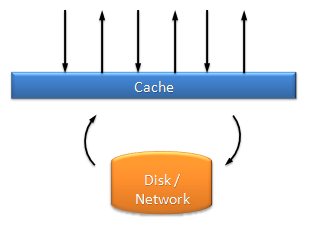
Remember back in kindergarten when the teacher taught that if you frequently access a file, you can keep a copy of it in memory and avoid doing so much I/O to gain performance? In this case an area of memory, also known as a cache, is loaded with the file’s content. After that, the various read accesses to the file are replaced by reads from the cache. When a write happens, the cache is updated and the write also goes to the file. In cases where writing is frequent, the cache is updated on every write while the file receives several modifications at once at defined intervals.
The cache implemented in the application loses its meaning if a given file is shared by more than one application; the content of application “A”‘s cache has to be the same as application “B”‘s cache, otherwise the changes made by application “A” would not be seen by application “B” and vice versa, not to mention that updates would be lost without the proper synchronization this would require.
That is why there is a centralized cache in the system. A module in the Kernel that keeps memory pages containing the content of recently handled files. When a file is opened, it is registered by its respective File System driver in the Cache Manager. But the Cache Manager doesn’t do everything alone. Actually it is part of a gang in the “hood” that ensures the optimization of file accesses in the system. For that, the Cache Manager counts on the help of its faithful companions, the Virtual Memory Manager and the File System Drivers.
Skipping a few tons of details, let’s say that when a read request reaches a file system driver, it forwards it to the Cache Manager, which will then satisfy that operation just by copying the desired content of the file that would already be in memory pages. Copying the data from memory is much faster than performing the whole ritual to obtain the same data from disk, but for that the data should already be loaded in memory.
Fernando, does the Cache Manager put the whole file in memory?
Want a crude answer? Yes and No ;-). The Cache Manager actually maps the open file into memory, and for that it relies on the most basic characteristics of virtual memory discussed in this other post. A range of addresses is reserved in the system, but such addresses do not yet reflect spaces in the memory chips; that is, a memory address exists, but its content is still on disk. The Memory Manager protects these addresses against accesses that may occur to them. When a read access is performed on these addresses, a page fault occurs and the Memory Manager then needs to retrieve the file data that is on disk and place it in memory. To do this, the Memory Manager will create a read request in the I/O Manager so that an IRP can be delivered to the respective file system driver of the file in question.
Stop everything, “for the love” of God! Fernando, you said right up there that when a read request reaches the file system driver, it is forwarded to the Cache Manager, which will copy the data already contained in memory in order to serve the request. But now you are saying that to load such memory pages the Cache Manager has a chat with the Memory Manager, which in turn will create a read request for the file system drivers. Doesn’t that seem a bit recursive to you?
I would say completely recursive, but remember that this will only happen when the file has not yet been read by any process, and therefore is not yet in the system cache. To tell one request from the other, file system drivers need to check the IRP_NOCACHE flag on the requests they receive. When requests come from an application, they do not carry the IRP_NOCACHE flag, and thus can be served by the Cache Manager; on the other hand, when the Memory Manager needs to supply the Cache Manager’s memory pages, such requests need to ignore the cache content, and that is why they carry the IRP_NOCACHE flag. To make it easier to understand this whole machine, look at the enumerated steps of a read of a file that is not yet in the cache.
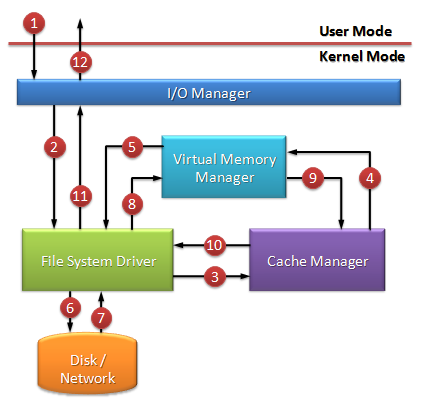
- An application makes a read request for a file.
- The I/O Manager creates an IRP and forwards it to its respective file system driver.
- The file system driver checks the absence of the IRP_NOCACHE flag and requests the copy of this file’s data from the cache to the application’s buffer.
- The Cache Manager tries to make the copy by accessing the pages that were mapped from the file. With this a page fault is generated by that access and is served by the Memory Manager.
- The Memory Manager creates a new IRP to serve the need to supply the Cache Manager. This request is recursively forwarded to the file system driver.
- This time the driver checks the presence of the IRP_NOCACHE flag and then creates the requests that will be served by the disk or network drivers.
- The media read requests are served.
- The memory pages are supplied and the page fault is satisfied.
- The Memory Manager re-executes the Cache Manager’s read attempt that generated the page fault, but this time the read access will succeed, because the data is now at the mapped memory address.
- The Cache Manager completes the copy of the data to the application’s buffer.
- The file system driver completes the read request.
- The data is returned to the application that made the initial request.
Attention now, boys and girls: the sequence described above illustrates the case where the Cache Manager still needs to load the file into memory. The next read attempts are satisfied directly by the Cache Manager, which will not generate a page fault. Don’t kill me with embarrassment by going around saying that the operating system always does the whole sequence for every file read.
Once again the basic rules of virtual memory are applied here so that, as the memory pages stop being accessed so frequently, they lose their place in the memory chips, and thus, if they are later accessed again, a new page fault will be generated.
Interesting to see how these components — the I/O Manager, Cache Manager, Virtual Memory Manager, File System Drivers, not to mention the filters that may still exist — all working together like black boxes, each with its role and without knowing the internal workings of the others, interacting with each other only through their public interfaces. Obviously, to the happiness of some and perhaps the sadness of others, I did not put all the details here, but they can be found in the well-known black-hen book.
But back to the subject…
Analogously, writes also use this same mechanism that involves file mapping. The simple fact of writing in the range of addresses kept by the Cache Manager will cause that page to be marked as modified, and later the Memory Manager will want to update that page on disk. This way we can summarize that write requests reach the File System drivers and are forwarded to the Cache Manager, which will simply write to the pages referring to the file’s content and complete the request. Page faults and system threads will take charge of updating whatever is needed at the most appropriate time. The important thing to note here is to think of the Cache Manager as a simple consumer of the Memory Manager’s services; all it needs to do is read or write to memory pages, and this is where the post’s title starts to make sense.
Nothing stops a dumb pointer from writing to memory pages that reference the content of files. If this happens, the rest of the system will take charge of updating that pointer’s atrocities on disk, corrupting the file. It is easy to notice that it doesn’t even take that many steps for this to happen.
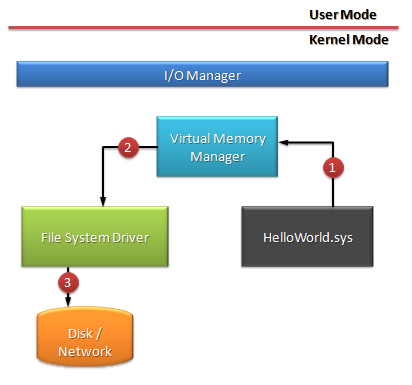
- An inexperienced driver eats that slice of pizza left forgotten in the microwave and goes totally nuts. After making a fool of itself, saying what it shouldn’t, crying and saying it thinks the world of you, the driver writes to memory pages referring to a data file. Like one of those SQL ones whose extension I can’t even imagine.
- The poor Memory Manager does its job to guarantee the children’s milk as if nothing wrong had happened.
- The file system driver goes along with it and consolidates the driver’s complete cluelessness, which by now is already hugging the toilet bowl.
- This step is not illustrated in the sequence above but can be explained on this site.
At this point you will be rooting for your brand-new driver to write over some vital system structure so that a blue screen can contain this reckless one’s activity. That is why the system is full of tests and checks to ensure that the user’s data is not lost. Better to see a blue screen than to have much worse consequences. Remember the wise Morphy:
Nothing is so bad that it can’t be made worse
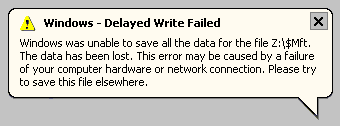 There are still many other interesting characteristics about the Cache Manager that I would like to describe here, such as the “Delayed write failure”, for example, but this post is already getting very big.
See you… 😉
Leave a Reply