


In the last post, in response to a question from a reader, I mentioned a little about how to create and use new IOCTLs. After all, the motto of this blog is “To serve well to serve forever.” Questions from readers are a great source of suggestions for new posts. I believe that like it is in any other specialty, driver development is a topic that can be broken up into many many parts. No wonder that the smallest book I know about driver development has not less than four hundred pages. So, it’s good to know what the reader’s difficulties are to know what subject to post here. Feel free to send further suggestions or questions. Some time ago, I had received an email from Fabio Dias (Fortaleza, CE – BRA), who suggested a post on how to access the Registry from a driver. Okay, let’s go.
HKEY_LOCAL_MACHINE is User-Mode stuff
Before going out there saying what APIs you should use to access the registry, let’s first take a look on how the registry is organized. I think the first step here is talk about opening a registry key. As in User Mode, we must have a string that informs the key path which we want to open, and thereby obtain a handle to it. Oops! Did I say I handle? Therefore, it is worth mentioning that the registry keys are also resources managed by the Object Manager. Registry keys are all stored under the “\Registry” namespace. Thus, in User Mode we use HKEY_LOCAL_MACHINE name as one of the basic divisions of the registry, whereas in Kernel Mode we use “\Registry\Machine “. Similarly to HKEY_USERS we have “\Registry\Users”. More details can be found here.
Which is the CurrentControlSet?
The DriverEntry routine of any Windows NT driver receives two input parameters, one being a pointer to the DRIVER_OBJECT structure, which represents the instance of our driver, and another parameter is a UNICODE_STRING containing the registry path, which indicates where our driver is registered. But how so? Can’t our driver know how it was registered in the registry? Here, in the reference is simple:
“The registry path string pointed to by RegistryPath is of the form \Registry\Machine\System\CurrentControlSet\Services\DriverName”
Okay, let’s take a ride on any driver and take a look at this using WinDbg. Let me open a parenthesis here to say to any new reader of this blog that I’m using a virtual machine to run the tests with a sample driver, as it is explained in this post. This allows me to do Kernel Debugging not necessarily having to use two machines. To make the driver replacement easier for each modification I do, I am using WinDbg mapping drivers, as it is explained in another post. This feature allows WinDbg to always load a new driver version in the TARGET machine without the need of having to manually replace the driver in it. Close parenthesis.
Even before the driver be loaded, I have put a breakpoint on its DriverEntry routine. Oops! How can you put a breakpoint in a driver that has not been loaded? Oh, OK … You can do this using the bu command, as it is shown below. The breakpoints will be set whenever the driver will be loaded. In the following line, I list the breakpoints, just to… When the driver isloaded, its execution stops at my breakpoint and I use the !ustr extension, which shows the UNICODE_STRING contents, so that we can see the value of its second parameter.
kd> bu KernelReg!DriverEntry
kd> bl
0 eu 0001 (0001) (KernelReg!DriverEntry)
kd> g
KD: Accessing 'Z:\Sources\DriverEntry\KernelReg\objchk_w2k_x86\i386\KernelReg.sys'
(\??\C:\WINDOWS\system32\drivers\KernelReg.sys)
File size 2K.
MmLoadSystemImage: Pulled \??\C:\WINDOWS\system32\drivers\KernelReg.sys from kd
Breakpoint 0 hit
KernelReg!DriverEntry:
f8d394a0 8bff mov edi,edi
kd> !ustr poi(pusRegistryPath)
String(114,114) at 82302000: \REGISTRY\MACHINE\SYSTEM\ControlSet001\Services\KernelReg
Mas não era pra ser CurrentControlSet? Na verdade o CurrentControlSet é um link para um outro ControlSet. No caso observado acima, o CurrentControlSet está refletindo o ControlSet001, ou seja, as alterações feitas no ControlSet001 são vistas no CurrentControlSet e vice-versa. O CurrentControlSet pode refletir qualquer outro ControlSet. Algumas regras determinam quando eles mudam, como em casos de mudanças de configurações de sistema ou instalações de drivers. Para saber para onde o CurrentControlSet está apontando, dê uma olhada no valor Current que está na chave “\Registry\Machine\System\Select” como mostra a figura abaixo.
Shouldn’t It be CurrentControlSet? Actually CurrentControlSet is a link to another ControlSet. In the case noted above, CurrentControlSet is reflecting ControlSet001, i.e., changes in the ControlSet001 are seen in CurrentControlSet and vice-versa. The CurrentControlSet can reflect any ControlSet. Some rules determine when they change, like in cases of system configuration changes or driver installation. To know where the CurrentControlSet is pointing to, take a look at the Current value, which is in “\Registry\Machine\System\Select” key, as it is shown below.
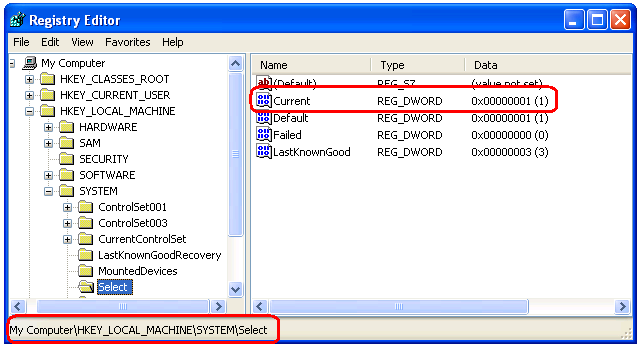
But that’s just for the sake of curiosity. When you use CurrentControlSet as part of the key path you wish to access, the Object Manager do the translation for you and everyone lives happily ever after.
Where is \Registry\Machine\Software?
It may have already happened to some of you. You write a driver that should read a value in a certain “\Registry\Machine\Software” key when the driver get loaded. While you do tests with the driver, which now has its Start set to Manual(3), everything works successfuly but, when you change the driver Start to Boot(0) or System(1), it is not possible to open the same key, the driver receives STATUS_OBJECT_NAME_NOT_FOUND (0xc00000034).
What did you mean by “name not found”? It was here right now! What happened is that the SOFTWARE key is mounted later. Thus, during the system boot it does not exist yet. To access that key you have to wait a little, perhaps using this post idea. Then everything will work like fine.
Anything to say about HKEY_CURRENT_USER?
Well, let’s think. Who is the Current User? The user who is making a system call, right? Thus, according to tradition, you start thinking it’s easy and when you are logged in as Paul you manually start your driver. During the call to its DriverEntry routine, the driver read settings for the user logged in, which are actually stored in the Paulo’s HKEY_CURRENT_USER. Well, that’s right up here. Yeah, it’s all wrong. For Paul point of view, the settings are right there, but the DriverEntry routine is called in system context, which incidentally is not Paul.
This is a problem faced even in User Mode, where services that run on system account try to open the HKEY_CURRENT_USER key. One thing we must bear in mind is that “The logged user” is not a simple system information. Try to imagine a Terminal Service, there may be multiple users logged in at the same time. Even when there is only one user logged into the system, threads can be executed in other user’s context or even in the system context. Drivers do not have its own context. Portions of the driver run in system context, others in arbitrary context. Depending on the driver type and its position within the device stack , it can receive calls in user’s context. That is the case of File System drivers for example.
Ah, OK! HKEY_CURRENT_USER will work! Er… How do I say that? No, it will not work. According to Microsoft’s reference, there is no simple translation to HKEY_CURRENT_USER, but there are routines that provide simplifications. After all this chat about context, you will still have to access the HKEY_USERS key, or rather, “\Registry\User” in the format already familiar to User Mode programmers used with HKEY_USERS. An example is: “\Registry\User\S-1-5-21-73586283-1897051121-839522115-500”. The equivalent for a system account is the “\Registry\User\.DEFAULT” key.
OK, ok, ok! An example please
Once again, I’m assuming you already know how to build and install a driver as it is explained in this post. The example code available for downloading at the end of this post can also be compiled on Visual Studio by using DDKBUILD, as this post explains. In this example I will show how to read two registry values that are in the key which it is shown below. To make the game more fun, when the driver get executed by the first time, it will create the key and its contained values when it realizes that it does not exist yet.
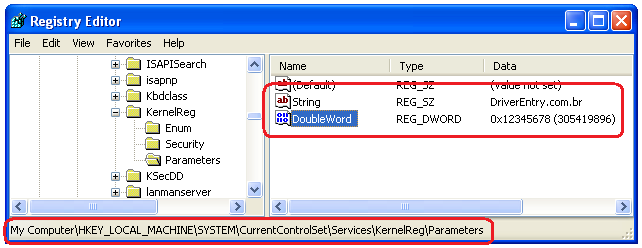
The values will be contained in a subkey of the one you received as a parameter in the DriverEntry routine. So our basic work on coding the DriverEntry routine is precisely to create the registry full path key that contains these values. With this UNICODE_STRING in hand, we will take it to the reading and writing in the registry routines. Below is the DriverEntry routine code. It does not contain anything special about the registry. As always, it’s worth a read on the comments.
/****
*** DriverEntry
**
** Our driver's entry point.
** Knife in the teeth and blood in the eyes.
*/
extern "C"
NTSTATUS
DriverEntry(__in PDRIVER_OBJECT pDriverObject,
__in PUNICODE_STRING pusRegistryPath)
{
UNICODE_STRING usParameters = RTL_CONSTANT_STRING(L"\\Parameters");
UNICODE_STRING usFullRegPath = {0, 0, NULL};
PWCHAR pwzBuffer = NULL;
NTSTATUS nts = STATUS_SUCCESS;
//-f--> Here we receive as a parameter the registry path up to
// our driver's key. Our parameters live in a
// sub-key named "Parameters". Let's build the
// full path by appending the sub-key name to the
// registry path we received as a parameter.
__try
{
__try
{
//-f--> Set the driver's unload callback routine.
pDriverObject->DriverUnload = OnDriverUnload;
//-f--> To do this append, we will need a buffer
// large enough to store the original string
// plus the size of the sub-key. Here we allocate
// this buffer.
pwzBuffer = (PWCHAR)ExAllocatePoolWithTag(PagedPool,
pusRegistryPath->Length +
usParameters.Length,
_KRN_REG_TAG);
if (pwzBuffer == NULL)
ExRaiseStatus(STATUS_INSUFFICIENT_RESOURCES);
//-f--> Now that we have the buffer, let's initialize the
// UNICODE_STRING structure for the string resulting from this append.
RtlInitEmptyUnicodeString(&usFullRegPath,
pwzBuffer,
pusRegistryPath->Length +
usParameters.Length);
//-f--> Copy the string received as a parameter
RtlCopyUnicodeString(&usFullRegPath,
pusRegistryPath);
//-f--> Concatenate the string "\Parameters"
RtlAppendUnicodeStringToString(&usFullRegPath,
&usParameters);
//-f--> Using the full path, try to load the parameters
nts = LoadParams(&usFullRegPath);
if (!NT_SUCCESS(nts))
{
//-f--> On failure, check whether the cause was the missing
// sub-key in the registry. This should happen when the
// driver is run for the first time. But if the failure
// is a different one, then each to their own problems.
if (nts != STATUS_OBJECT_NAME_NOT_FOUND)
ExRaiseStatus(nts);
//-f--> Let's create the sub-key and write the
// pre-defined values.
nts = CreateParams(&usFullRegPath);
if (!NT_SUCCESS(nts))
ExRaiseStatus(nts);
//-f--> Try to read the parameters again.
// Okay, I know this is silly. After all, if I
// just created the parameters, why would I
// read them again? Well, just to illustrate.
nts = LoadParams(&usFullRegPath);
if (!NT_SUCCESS(nts))
ExRaiseStatus(nts);
}
}
__finally
{
//-f--> Cleaning up the mess.
if (pwzBuffer)
ExFreePool(pwzBuffer);
}
}
__except(EXCEPTION_EXECUTE_HANDLER)
{
//-f--> Oops!
nts = GetExceptionCode();
ASSERT(FALSE);
}
return nts;
}
Let’s play with UNICODE_STRING a little more. Let’s look at the routine that writes the registry values. This routine does not offer anything much different than we’re used to seeing in User Mode. However, it’s like they say: “One example is worthier than a thousand articles.” Wow, that was terrible! I need to stop doing this. You must be thinking now: “Wow! What I need to read to have a driver example.”
/****
*** CreateParams
**
** This routine is called when the key that contains
** the parameters is not detected. It creates the key and the parameters
** with pre-defined values.
*/
NTSTATUS
CreateParams(__in PUNICODE_STRING pusRegistryPath)
{
HANDLE hKey = NULL;
NTSTATUS nts = STATUS_SUCCESS;
OBJECT_ATTRIBUTES ObjAttributes;
UNICODE_STRING usStringParam = RTL_CONSTANT_STRING(L"String");
UNICODE_STRING usDWordParam = RTL_CONSTANT_STRING(L"DoubleWord");
ULONG ulParam = 0x12345678;
WCHAR wzParam[] = L"DriverEntry.com.br";
__try
{
__try
{
//-f--> No secret here. It's all quick and easy.
InitializeObjectAttributes(&ObjAttributes,
pusRegistryPath,
OBJ_CASE_INSENSITIVE,
NULL,
NULL);
//-f--> Create the new key and request
// access to set values inside it.
nts = ZwCreateKey(&hKey,
KEY_SET_VALUE,
&ObjAttributes,
0,
NULL,
REG_OPTION_NON_VOLATILE,
NULL);
if (!NT_SUCCESS(nts))
ExRaiseStatus(nts);
//-f--> Set the numeric value
nts = ZwSetValueKey(hKey,
&usDWordParam,
0,
REG_DWORD,
&ulParam,
sizeof(ulParam));
if (!NT_SUCCESS(nts))
ExRaiseStatus(nts);
//-f--> Set the string value
nts = ZwSetValueKey(hKey,
&usStringParam,
0,
REG_SZ,
&wzParam,
sizeof(wzParam));
if (!NT_SUCCESS(nts))
ExRaiseStatus(nts);
}
__finally
{
//-f--> Close the handle of the newly created key
if (hKey)
ZwClose(hKey);
}
}
__except(EXCEPTION_EXECUTE_HANDLER)
{
//-f--> Oops!
nts = GetExceptionCode();
ASSERT(FALSE);
}
return nts;
}
Finally the funny part of this story. I believe that most of the fun is concentrated in the ZwQueryValueKey routine, which performs the reading of values in the registry.
NTSTATUS
ZwQueryValueKey(
IN HANDLE KeyHandle,
IN PUNICODE_STRING ValueName,
IN KEY_VALUE_INFORMATION_CLASS KeyValueInformationClass,
OUT PVOID KeyValueInformation,
IN ULONG Length,
OUT PULONG ResultLength
);
The point that differs from the API used in User Mode to do the same task is the third parameter KEY_VALUE_INFORMATION_CLASS. An enum that tells what information we would get on a particular value in the registry. One of them asks only the name while another asks all the information and the latest all the partial information referring to the value.
typedef enum _KEY_VALUE_INFORMATION_CLASS {
KeyValueBasicInformation,
KeyValueFullInformation,
KeyValuePartialInformation
} KEY_VALUE_INFORMATION_CLASS;
For each enum value, a different structure is returned. Always in a single block, the structure can bring a variety of information using offsets telling where to find the data within that single memory allocation.
In the example, I used the KeyValuePartialInformation, which I imagine to be the most used. Once again my tip is to read the comments at the excerpt below.
/****
*** LoadParams
**
** This routine loads the global variables with the
** values retrieved from the registry.
*/
NTSTATUS
LoadParams(__in PUNICODE_STRING pusRegistryPath)
{
HANDLE hKey = NULL;
NTSTATUS nts = STATUS_SUCCESS;
OBJECT_ATTRIBUTES ObjAttributes;
UNICODE_STRING usStringParam = RTL_CONSTANT_STRING(L"String");
UNICODE_STRING usDWordParam = RTL_CONSTANT_STRING(L"DoubleWord");
ULONG ulBytes = 0;
PWCHAR pwzBuffer = NULL;
PKEY_VALUE_PARTIAL_INFORMATION pValueInfo = NULL;
__try
{
__try
{
//-f--> Build the ObjectAttribute
InitializeObjectAttributes(&ObjAttributes,
pusRegistryPath,
OBJ_CASE_INSENSITIVE,
NULL,
NULL);
//-f--> Try to open the registry key
nts = ZwOpenKey(&hKey,
GENERIC_READ,
&ObjAttributes);
if (!NT_SUCCESS(nts))
ExRaiseStatus(nts);
//-f--> Since the value has a fixed size, we can determine
// the buffer size needed to read the value from the
// registry.
ulBytes = sizeof(KEY_VALUE_PARTIAL_INFORMATION) +
sizeof(ULONG) - sizeof(UCHAR);
//-F--> Allocate the buffer for the read.
pValueInfo = (PKEY_VALUE_PARTIAL_INFORMATION)
ExAllocatePoolWithTag(PagedPool,
ulBytes,
_KRN_REG_TAG);
if (!pValueInfo)
ExRaiseStatus(STATUS_INSUFFICIENT_RESOURCES);
//-f--> Here we do the read.
nts = ZwQueryValueKey(hKey,
&usDWordParam,
KeyValuePartialInformation,
pValueInfo,
ulBytes,
&ulBytes);
if (!NT_SUCCESS(nts))
ExRaiseStatus(nts);
//-f--> We make sure we read a DWORD
ASSERT(pValueInfo->Type == REG_DWORD);
//-f--> Here we load our global variable
// with the value read from the registry.
g_ulParam = *(PULONG)pValueInfo->Data;
//-f--> Free the read buffer and zero the pointer.
// You may decide to allocate the read buffer
// based on the largest value you need to read,
// and thus use the same buffer to read all
// the smaller values. Here, once again, I am
// redoing everything to demonstrate.
ExFreePool(pValueInfo);
pValueInfo = NULL;
//-f--> Since the string can have any size in the registry,
// we will offer zero bytes of read buffer so that
// the API tells us how much it needs for the whole buffer.
nts = ZwQueryValueKey(hKey,
&usStringParam,
KeyValuePartialInformation,
NULL,
0,
&ulBytes);
//-f--> We must get one of these errors.
ASSERT(nts == STATUS_BUFFER_OVERFLOW ||
nts == STATUS_BUFFER_TOO_SMALL);
//-f--> Here we allocate a buffer of the size
// requested by the API.
pValueInfo = (PKEY_VALUE_PARTIAL_INFORMATION)
ExAllocatePoolWithTag(PagedPool,
ulBytes,
_KRN_REG_TAG);
if (!pValueInfo)
ExRaiseStatus(STATUS_INSUFFICIENT_RESOURCES);
//-f--> Now we will do the read again, but this time
// offering a buffer of a decent size.
nts = ZwQueryValueKey(hKey,
&usStringParam,
KeyValuePartialInformation,
pValueInfo,
ulBytes,
&ulBytes);
if (!NT_SUCCESS(nts))
ExRaiseStatus(nts);
//-f--> We must have read a string.
ASSERT(pValueInfo->Type == REG_SZ);
//-f--> Now let's allocate the buffer that will be used to hold
// the string read from the registry. So we can discard the buffer
// used by the read. The DataLength field brings the size of the
// unicode string with the zero terminator. Note that this structure
// does not bring a UNICODE_STRING, but a WCHAR array.
pwzBuffer = (PWCHAR)ExAllocatePoolWithTag(PagedPool,
pValueInfo->DataLength,
_KRN_REG_TAG);
if (!pwzBuffer)
ExRaiseStatus(STATUS_INSUFFICIENT_RESOURCES);
//-f--> After some time programming, you get quick with some
// things. I bet someone, and that includes myself, will one day
// Copy-Paste this function to use somewhere else. Here,
// anticipating that the registry read may happen several times,
// and so, if there is an allocation from a previous read, we will
// deallocate it.
if (g_usParam.Length)
RtlFreeUnicodeString(&g_usParam);
//-f--> Initialize the global string with the buffer we just allocated.
// Even though we set a buffer for this UNICODE_STRING, it is
// still empty (Length=0)
RtlInitEmptyUnicodeString(&g_usParam,
pwzBuffer,
(USHORT)pValueInfo->DataLength);
//-f--> Here we append the WCSTR (zero-terminated WCHAR array), read
// from the registry into our empty buffer. This is similar to a copy,
// but with an incredible advantage: not using wcslen().
// Never mind, it's purist paranoia. So we leave it to the API to
// determine the Length and MaximumLength of the UNICODE_STRING. Remember
// that the zero terminator is not counted as part of the UNICODE_STRING.
RtlAppendUnicodeToString(&g_usParam,
(PCWSTR)pValueInfo->Data);
}
__finally
{
//-f--> General cleanup
if (pValueInfo)
ExFreePool(pValueInfo);
if (hKey)
ZwClose(hKey);
}
}
__except(EXCEPTION_EXECUTE_HANDLER)
{
//-f--> Oops! I did it again.
nts = GetExceptionCode();
ASSERT(FALSE);
}
return nts;
}
Phew! What a big code! In this first part of the issue I have used the APIs that most closely resemble the User Mode ones. In the next post I will bring a different way of doing the same thing we did here.
I hope I could help.
CYA…
Leave a Reply