

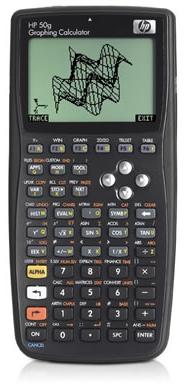
Finally, the exam period has ended. Now I can return to normal life, reintegrate into the society and why not, write posts. For those who did not know, I’m studying computer engineering at Universidade São Judas Tadeu. Despite my thirty-years-old, I’m still in the third year due to a hectic life that a programmer is suppose to have. I’m sure many of you know exactly what I’m talking about. I had to interrupt my course several times because of lack of money or overwork. Anyway, these past few weeks I was in a rush and I could not compose a decent post. So, you will have to be glad for some funny facts about my new best friend, the HP 50G.
I usually say that a programmer is not a name of a profession, but a name of a disease.”Programmer: A person who suffers for programming”. One of the symptoms that I find most decisive for a programmer their great ability to associate different things with programming, even involuntarily. An example? Easy! When I was studying Industrial Informatics at ETE, there was a teacher who used to speak slowly, about 3 seconds among sentences. He looked like an android. I used to imagine that characteristic was due to the fact the teacher had little RAM, thus took a while to load a new sentence from the HD to be processed by the speech synthesizer. At that time, we said if we had paid attention, we could see a blinking LED in his ear during those breaks. Fortunately, it could be easily solved if there had been a second thread to put the next phrase in RAM as the current phrase was used by the main thread. I do not know what you think about it, but it seems disease for me. :-S
Studying for Computational Numerical Calculus tests and armed with a HP 50G, it was inevitable to program it to automate some steps. The exercises in this subject consist basically of arithmetic, but they are long and full of little rules. Baing a Programming carrier since the age of 13, I have downloaded the manuals and got to work. When an HP is bought, it comes with a “Quick Start” document having 120 pages; but don’t worry, you can download the complete PDF manual having 918 pages in Portuguese.
As it might be expected, I’ve found many sites and tutorials on the subject, even several in Portuguese. The site hpcalc.org was a major contributor. On the page about programming you can find a lot of things. And the best thing, it’s all for free.
We can program the HP either in UserRPL or SystemRPL. Programming in SystemRPL gives us a performance gaining of almost 10 times higher than in UserRPL. However, everything in life has a price. The excerpt below was taken from one of the several PDFs I’ve found.
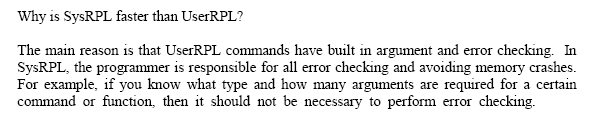
Strange! I could swear I have already read something like that somewhere.
Because I was unable to download a WinDbg version to debug my HP, I decided to program in UserRPL anyway. The language is basically composed of a sequence of keys that were pressed during normal use of the calculator, but we can still use execution blocks, repeating loops (for/while), conditional execution (if, else), sub-programs execution and many other things that I had no patience to read. It’s funny to mix things like IF and ELSE commands that do array operations as if they were as simple as adding one to one.
HP can be programmed on itself, I mean using its own keyboard. But writing on that mini keyboard is similar to play Decathlon on Atari. It works, but you know what will end up happening. Another super uncomfortable thing is trying to understand what is wrong in your program just looking at the source code (which is not indented) on a small LCD screen. One of the facilities is a USB cable that connects the HP to your PC.
To access the stored directories and variables in the calculator, you’ll have to download the software that makes this connection. But if you have an x64 machine (even HP), there will not be drivers available to make this connection. If this is your case, you can use a virtual machine that is running a 32-bit operating system. Wow! That really works!
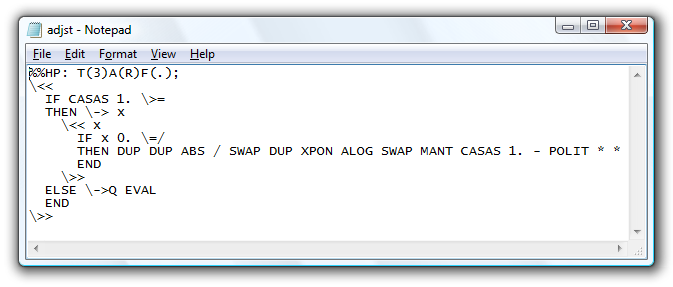
When connected, it displays a kind of “Explorer” where you can browse the folders and edit variables and programs. With a double-click on the programs, an excellent development environment called “Notepad” opens with its program. Don’t think of indenting your program. When the program is sent to HP, it takes its own indentation, which is not obviously the same as we would like to take.
Well, at least it was interesting to learn more of this. It was really worth spending that money buying something I can program and be able to keep my addiction. But it still does not stop there. If you take a look at the quantity and variety of applications to download from hpcalc.org, you will have an idea whatelse it can do besides calculating the matrix determinant. If you’re curious, you can download a calculating emulator on your PC and make a Test Drive.
Leave a Reply